Read across the operation
Bring pipeline, schedule, follow-up, invoices and lead sources into one view.
THE OWNER VIEW
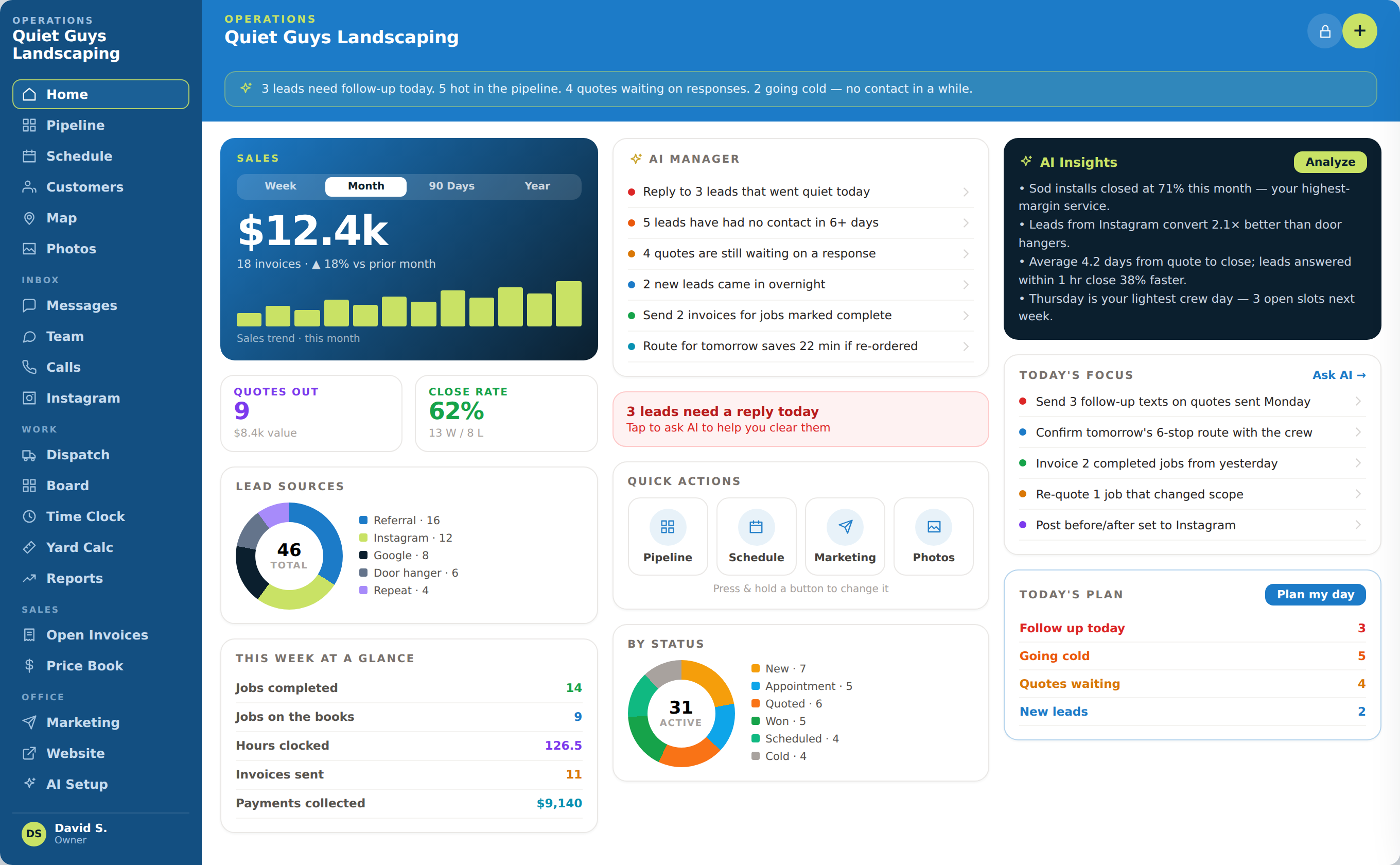
See the conversations, work and revenue that need attention now—without asking the team to rebuild the answer across separate tools.
WHAT COMES IN
WHAT OPSLY CREATES
HOW IT WORKS
Bring pipeline, schedule, follow-up, invoices and lead sources into one view.
Identify conversations, quotes and balances that are waiting too long.
Give the owner and team a clear place to start instead of another static report.
WHAT OPSLY ACTUALLY DOES
Each action keeps the customer, the work and the outcome connected instead of creating another isolated tool.
Surfaces leads needing replies, stale opportunities, waiting quotes and new inquiries.
The team starts with the work most likely to affect customers and revenue.
Shows sales, quotes, close rate and opportunities by status in one owner view.
Owners can see whether demand is moving or stalling.
Connects lead volume and supported outcomes to sources such as referrals, Instagram and Google.
Marketing decisions can be based on operating results instead of lead counts alone.
Shows jobs on the books, team load and available scheduling space.
Owners can fill openings and balance upcoming work.
Identifies completed work needing invoices and displays open invoices and recorded payments.
Delivered work is converted into cash more consistently.
AUTOMATION WITH CONTROL
AI and automation move the routine steps. Your team keeps authority over rules, exceptions and customer commitments.

WHAT THIS CHANGES
See the customer and operational items that deserve attention first.
Understand activity, outcomes and revenue in the context of the full customer journey.
Turn operating signals into practical actions the team can review and complete.
OWNER EXAMPLE
Opsly turns scattered operating signals into a short list the owner and team can review and clear together.
The owner opens Opsly at the beginning of the day.
The dashboard shows unanswered leads, aging opportunities, waiting quotes and newly completed work.
AI Manager groups those signals into actions such as replying to three leads or invoicing two completed jobs.
The owner opens each underlying record, assigns the work and changes the schedule where needed.
The dashboard updates as the team completes the actions, keeping priorities and results current.
WHAT STAYS CONNECTED
SEE THE COMPLETE CUSTOMER JOURNEY